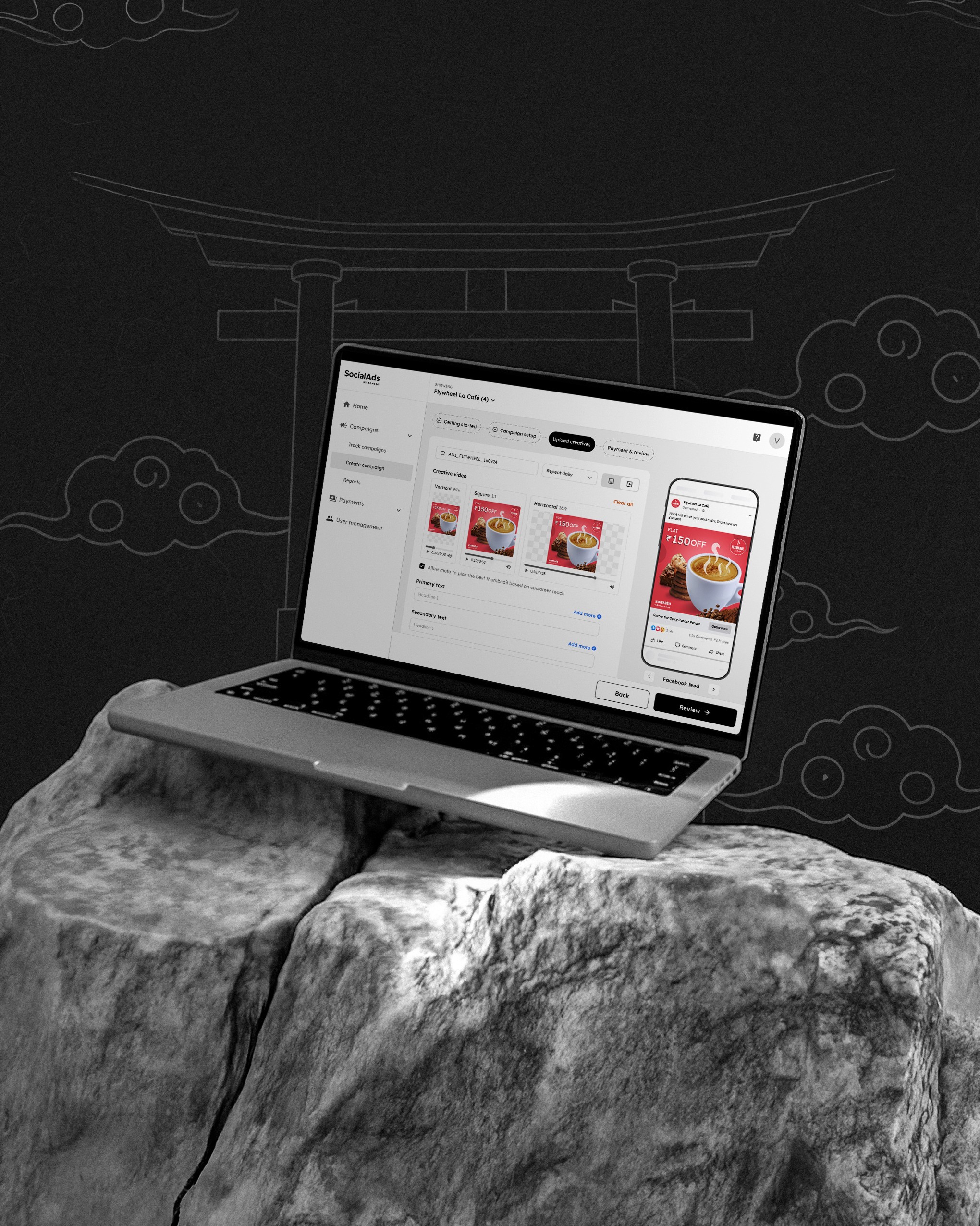
Socialads by Zomato
Duration
~4 months (Aug 2024)
Tags
#B2B
#0 —>1
#Web Platform
Role
Founding designer
Socialads is a one-stop digital advertising platform by zomato that helps restaurant partners and brand managers create and manage their digital ads outside Zomato. Most partners found platforms like Meta and Google Ads too complex and time-consuming for something as fast-paced as the food industry. Socialads was designed to remove that complexity and make campaign creation simple, fast, and reliable. As the founding and solo designer, I built the product experience from the ground up, and simultaneously establishing the web UI language that later shaped Zomato’s partner web design system.

Why?
Most restaurant partners are unaware of the potential of digital advertising
The idea began with a simple gap we noticed in the ecosystem. Zomato’s in‑app ads work well when a customer has already decided to order food. At that stage, the intent is clear and restaurants are competing within the app. The bigger challenge lies earlier, when someone is hungry but hasn’t yet made a decision or even opened the Zomato app. This is where mouth‑watering food ads matter the most. Showing the exact dish someone is craving, at the exact time they want to eat, from a restaurant they already like, can pull them into the Zomato.
Reaching users in this moment requires digital advertising outside the app, something most restaurant partners were not actively using or fully aware of. Digital advertising was largely limited to big restaurant brands with dedicated marketing teams. Smaller merchants often stayed away from such tools because they didn’t know where to start, and even when they tried, the process felt too complex and difficult to trust.
Social Ads was built to bridge this gap by helping every restaurant, regardless of size, understand and access advertising easily. It wasn’t just about simplifying the process, but also about building trust and showing that investing in ads can deliver visible results.
Business Goals
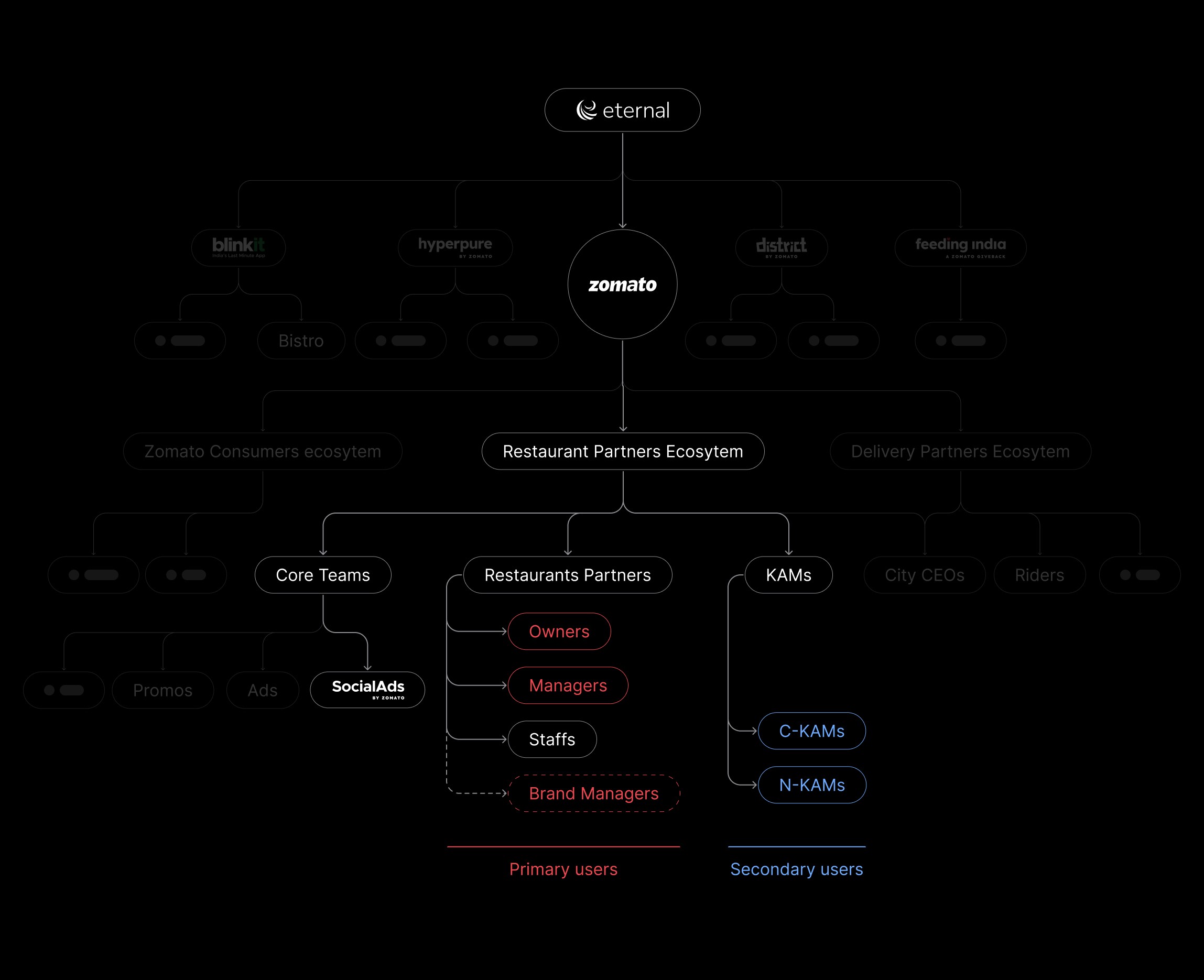
Product ecosytem
Understanding users
Understanding our Partners/ Indirect competitors
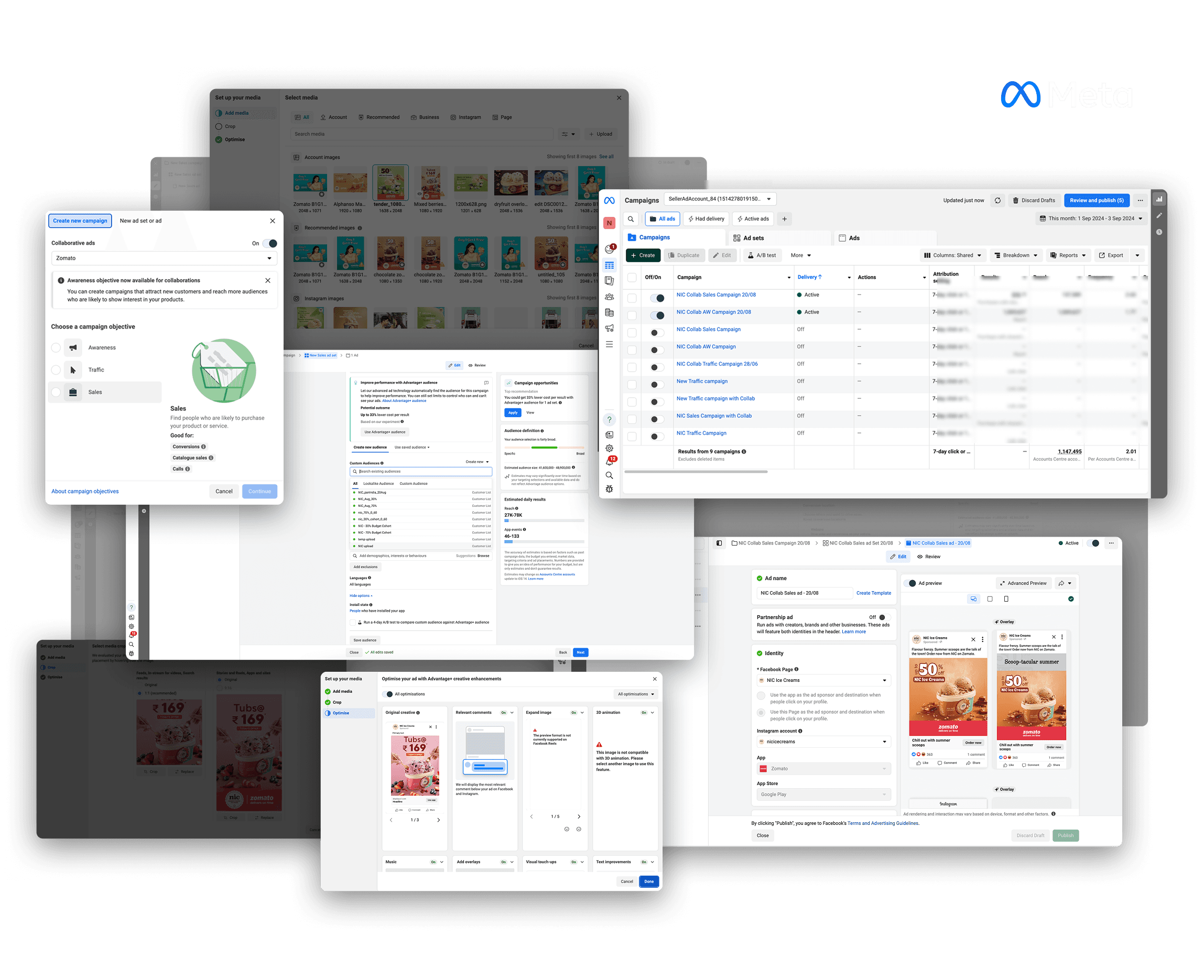
I studied major ad-campaign tools like Meta & Google Ads to spot patterns and see what worked and what didn’t.
Before shaping the structure of our own ad creation flow, I spent time studying Google Ads and Meta Ads in detail. Both tools are incredibly powerful, but they are built for a wide range of industries, not specifically for restaurants. This makes them overwhelming for first time users who are expected to learn a long list of terms, steps, and controls before they can run even a basic campaign. Some inputs feel unnecessary for food ordering, some steps feel repetitive, and several metrics make sense only if you understand ad‑tech deeply. While exploring them, I focused on the inputs they collect, the decisions they expect users to make, and how they reveal information throughout the flow. I looked for patterns in layout, structure, and process, and tried to understand which parts help users and which ones slow them down. This helped me plan how to simplify the complexity through progressive disclosure, so advanced users still have control while everyday restaurant partners get a faster, more direct experience.
Birds-eye view
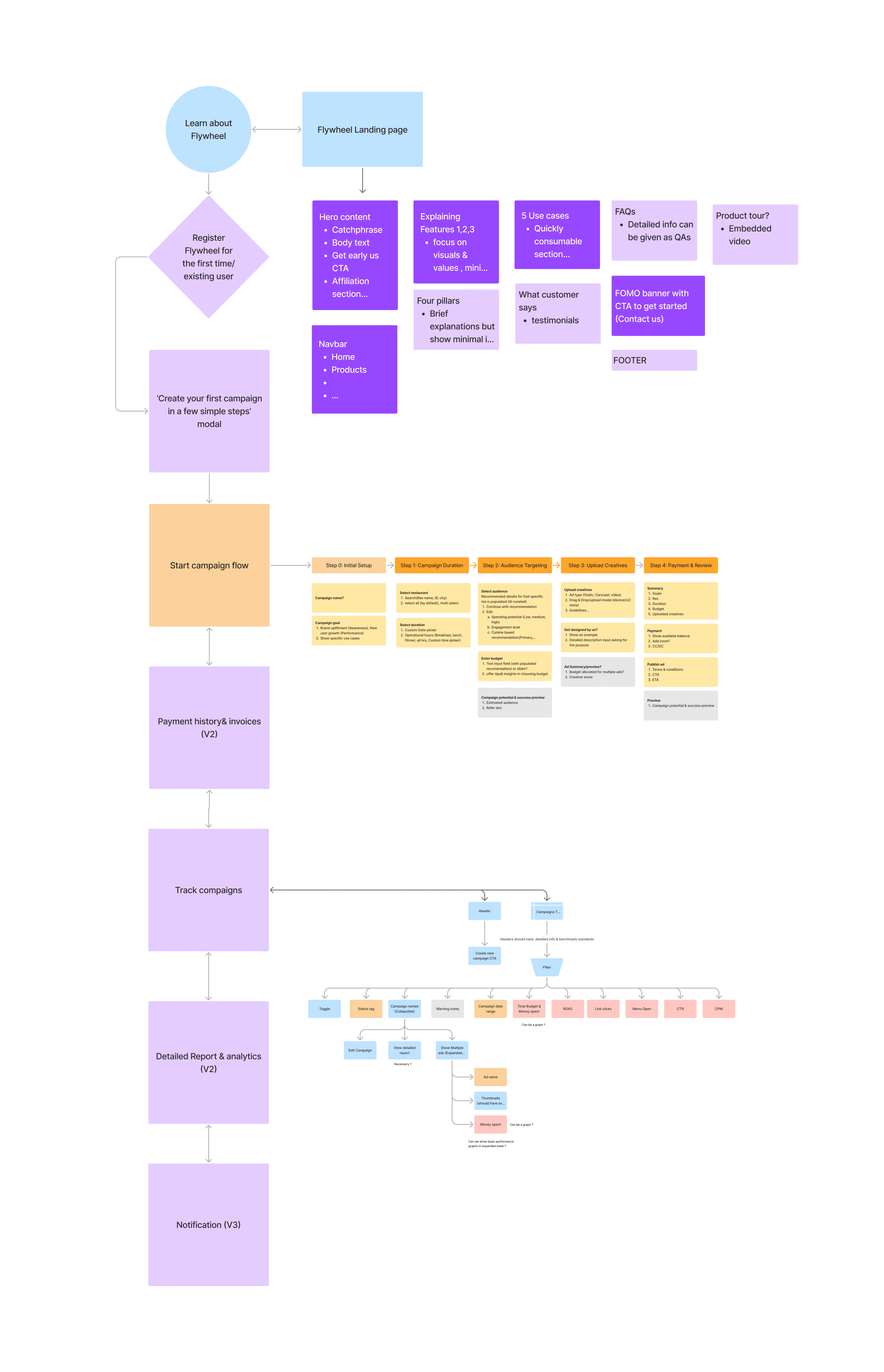
Breaking the scattered requirements into clear flows to make the product easier to understand for everyone involved.
With a lean team and no PM, most of the early direction came from long conversations with the engineering lead and business heads, and I had to translate those evolving ideas into something structured and workable. I started the project by laying everything out visually, breaking down complex PRDs into simple flows and bird’s‑eye diagrams so I can understand how the product behaves before I think about how it looks. From there, I sketch out different paths a user might take, explore multiple versions of the same idea, and slowly narrow down what could form the first version of the product.
Ideation
Ideation for this project was never a straight line
My ideation process began once the basic requirements and user flows were clear. From there, I identified the key features for the MVP and started exploring layouts and structures for key components and screens. Low‑fidelity wireframes gave enough structure to understand the experience, but were still lightweight enough to change without friction. They helped me compare alternatives, test assumptions, identify gaps, and gather initial feedback from the team long before we committed to anything. Even when a solution seemed obvious, I made a point to revisit it, question it, and see if a better or more efficient path existed. Only after the core idea felt aligned across engineering, business, and design did I move into high‑fidelity screens.

Partner web design system
Setting the direction for partner tools and dashboards on web
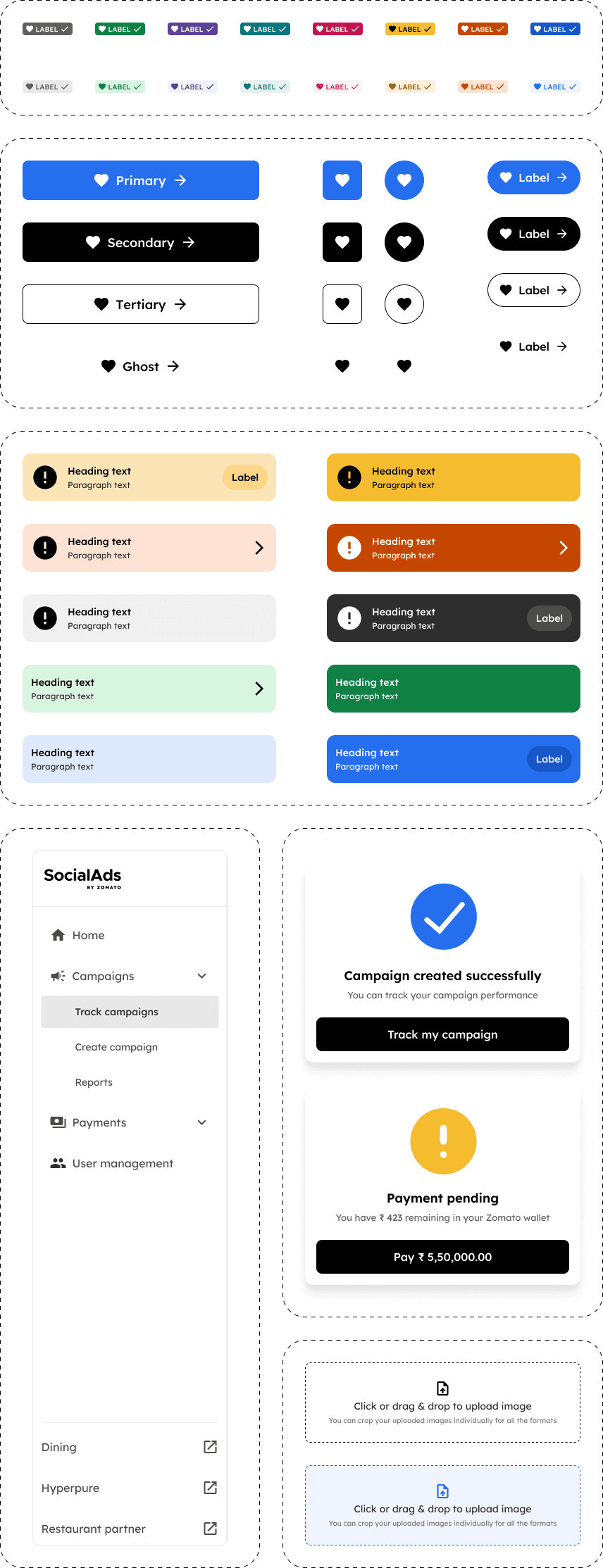
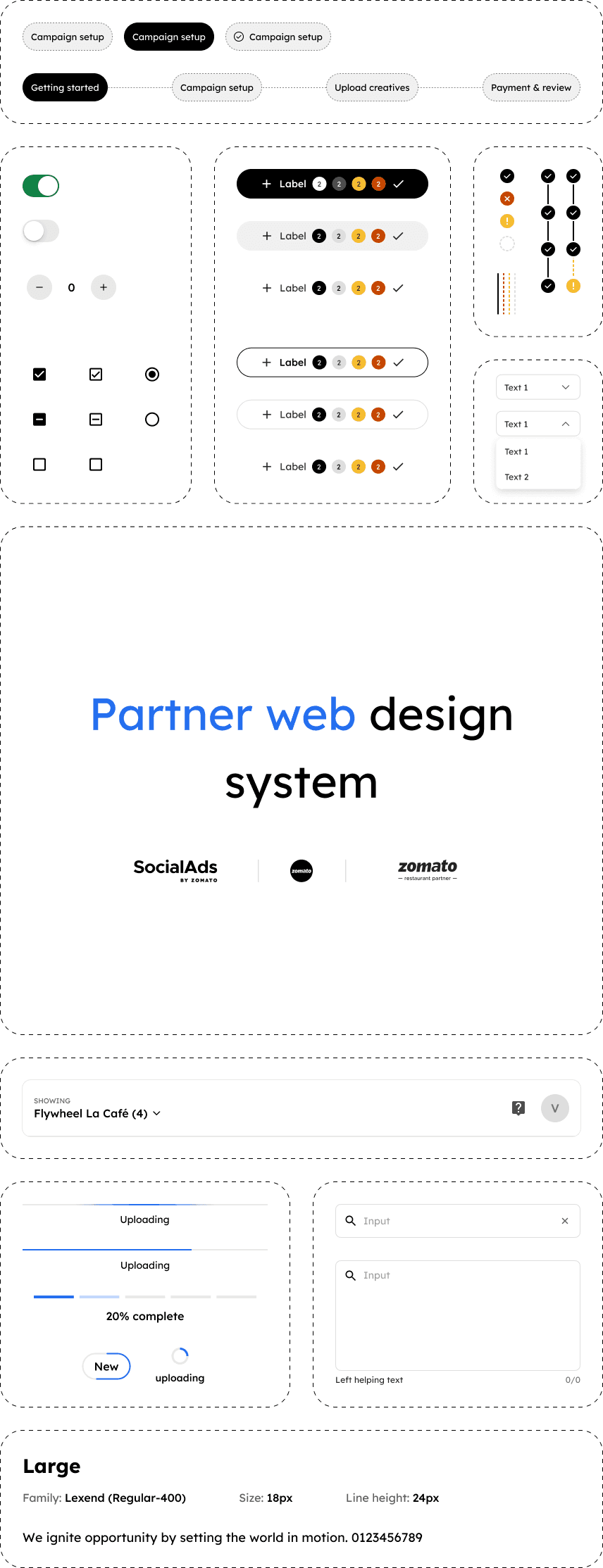
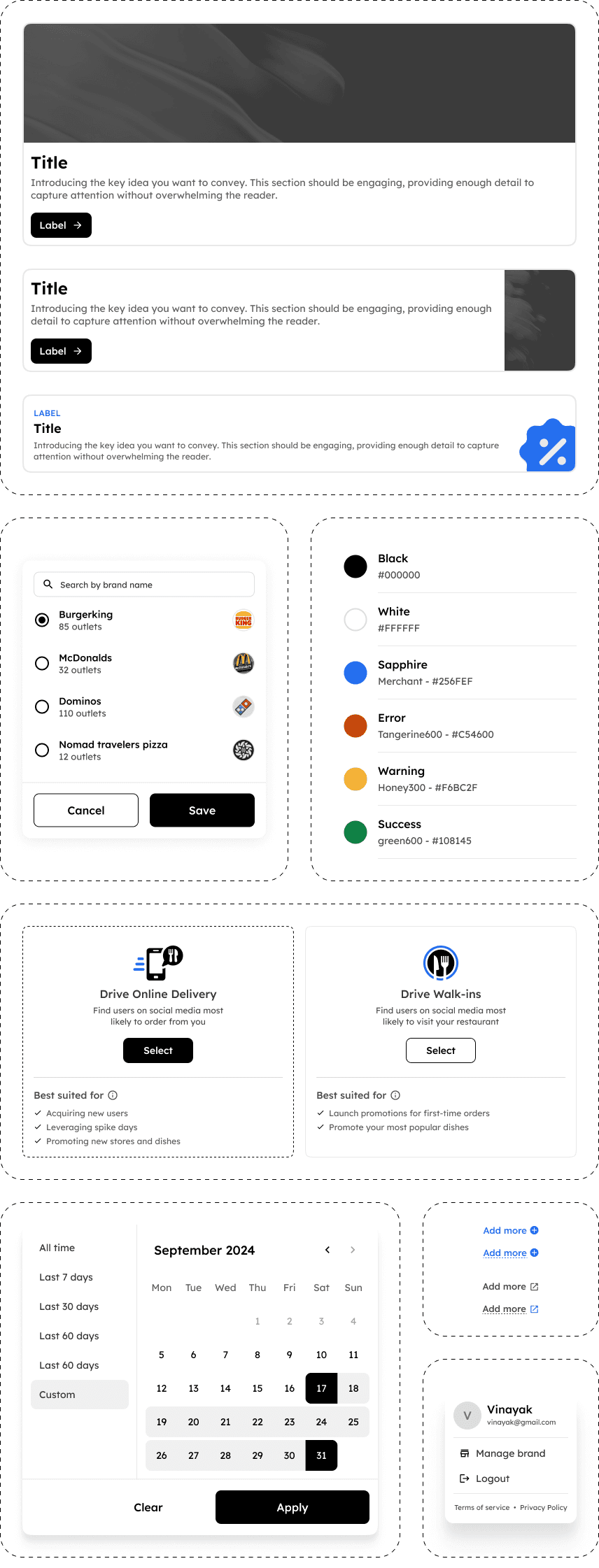
When this project began, Zomato’s Sushi design system already existed as a mature set of base tokens. At the same time, the organisation was moving toward a more semantic, fully tokenised approach. To support this shift, the Partner Design System was being established for delivery and restaurant partner apps. However, when I started working on Social Ads, it was still at a very early stage, with only a handful of components.
A key challenge with this early partner design system was that it had been built primarily for mobile apps, with little consideration for web-specific needs such as large-screen responsiveness, cursor-based interactions, or dashboard-heavy patterns. This highlighted the absence of a dedicated web-first layer. To address this, I actively designed web-specific components, interaction patterns, and scalable layouts—many of which were explored for the first time at Zomato and later integrated back into the Partner Design System.
As a result, Social Ads became the first validation ground for partner-facing web tools, shaping how the the future partner web tools would look, behave, and scale going forward.
The End-to-End Experience
Showing some of the key flows and features that best represent how the product works end to end.
I’ve focused on the flows that shaped the structure of the product, influenced major decisions, or needed the most careful thinking. These snapshots show how users move through the system, how features connect, and how the overall experience comes together.
# Landing Page to create organic interest
We started with a landing page to build curiosity, and capture early sign‑ups before the dashboard was ready. The focus was on explaining the idea in a simple, marketing‑led format. Unlike typical Zomato partner pages, this was designed to establish a distinct identity for Social Ads as a standalone product.
# Simplifying Campaign Creation into just 4 steps
We simplified a complex advertising setup into a clear four‑step flow. Users no longer need to spend hours configuring campaigns or making technical decisions. The system handles the complexity in the background so they can focus only on launching.
# Balancing Ease of Use with Advanced Customizations
By default, the experience stays simple, with the right settings already in place for most users. For those who want to go deeper, advanced controls are revealed progressively, often within a single click. While only a few examples are highlighted here, this layered approach runs consistently across the entire product.
# Setting Expectations Through Simulated Data
We use simulated real‑time data through infographics to help users understand what to expect before launching a campaign. When decisions start deviating from system‑suggested settings or show signs of weak performance, we clearly indicates that through warnings before allowing users to proceed. This reduces uncertainty and gives a sense of relief while making decisions. When the outcomes matches the promise or exceed what was indicated, it builds long‑term trust in our system.
# Realistic Ad Preview Before Launch
We give users a realistic view of how their ads will appear on the platform, allowing them to adjust captions, visuals and supporting CTA texts before anything goes live. This helps them refine copy based on how it displays, avoid truncation issues and make confident choices without unnecessary trial and error. The same workflow supports multiple creatives with live previews, where users can test several captions and let the system pick the best‑performing variation.
# In‑Product Tools for Basic Edits
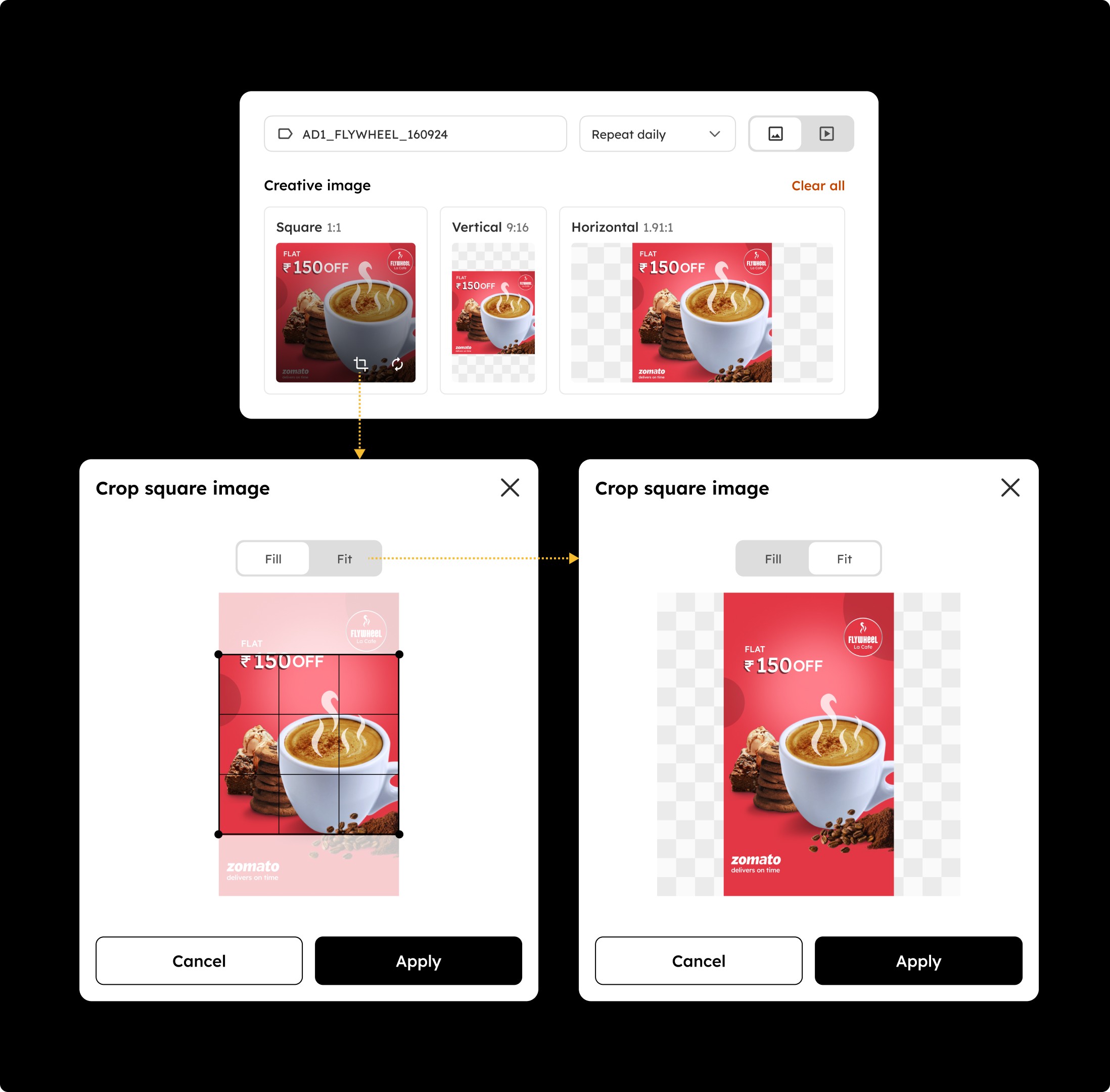
Since Meta and Google Ads use various aspect ratios depending on the placement, we added simple crop, fill and fit controls so users don’t need tools like Photoshop or Premiere Pro for basic edits. When a single image or video is uploaded, it automatically populates all required aspect ratios. This lets users make small adjustments directly within the product then and there.
# AI Checks for Creative Quality and Compliance
Our system runs an instant AI check on every creative to ensure it meets both Zomato’s standards and the guidelines set by Meta and Google Ads. Soft warnings appear when a creative may underperform or need refinement, allowing users to proceed with caution. Hard warnings flag serious issues, and in those cases the system blocks the creative from moving forward to prevent rejection or campaign failures.
# Destination Mapping for Campaigns
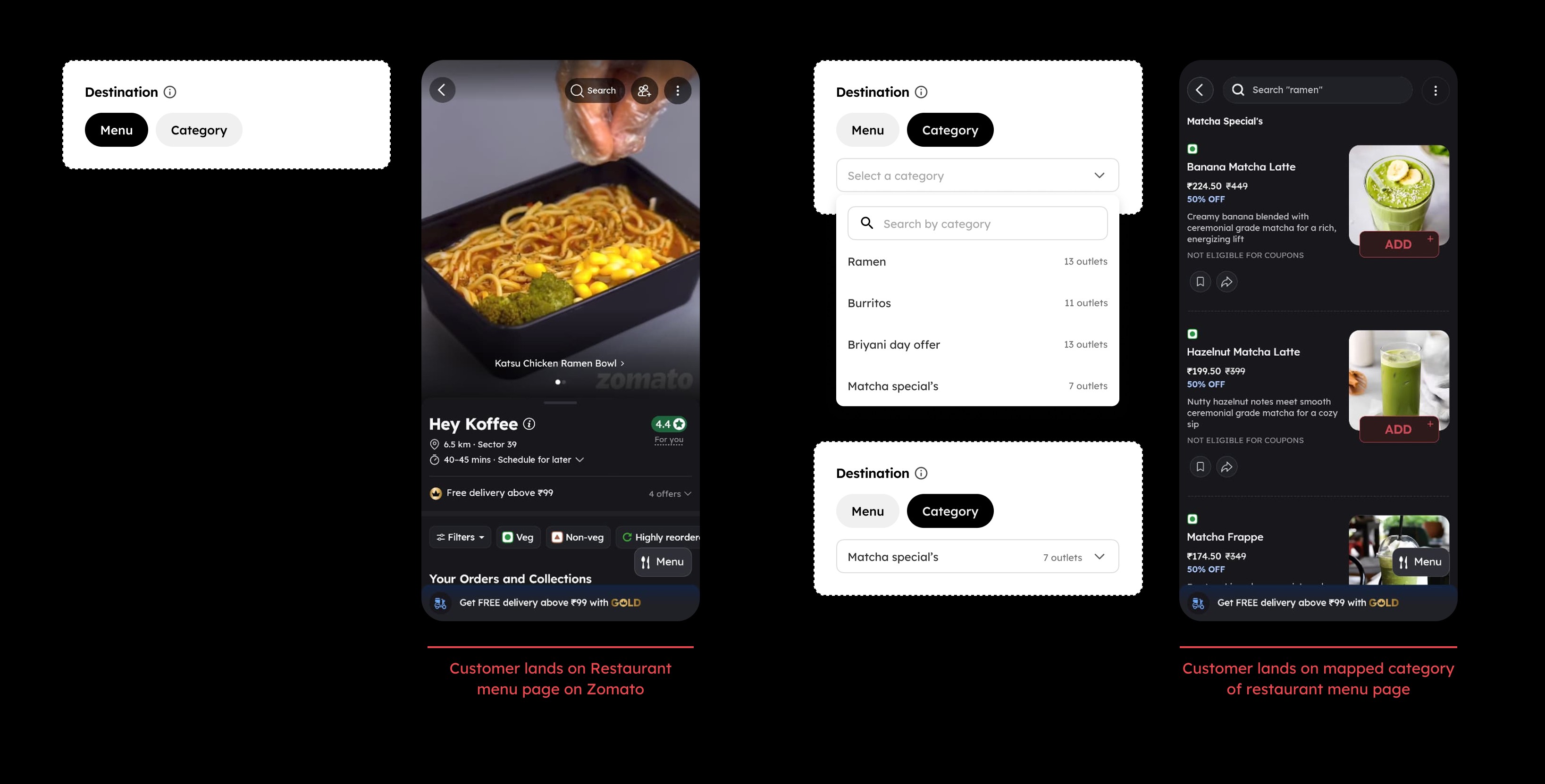
Users can choose to direct customers to a specific category when their campaign focuses on a theme or a newly created category built just for that promotion. This helps align the creative with the exact section the campaign is meant to highlight rather than sending traffic to the top of restaurant menu page
# Flexible payment options
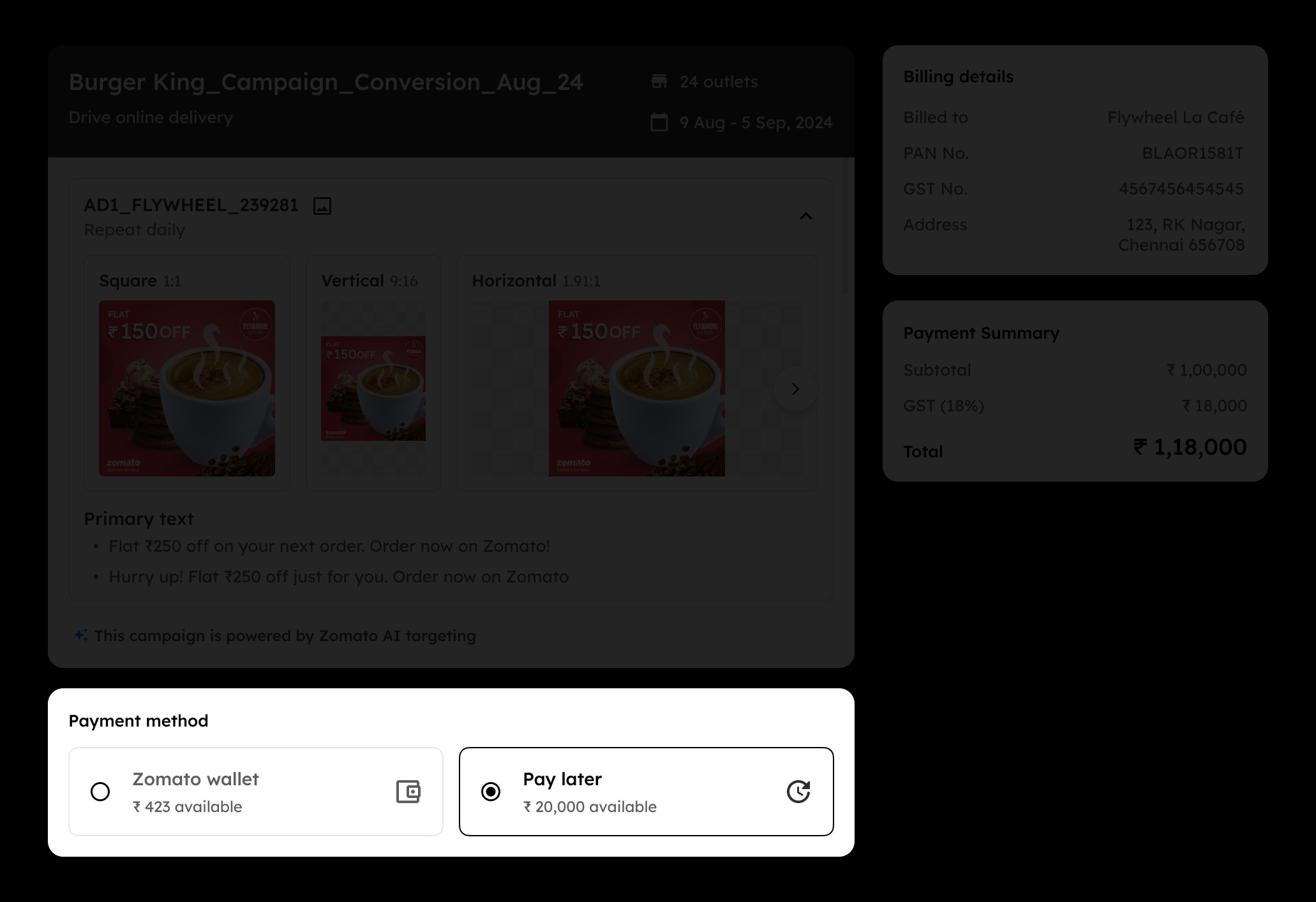
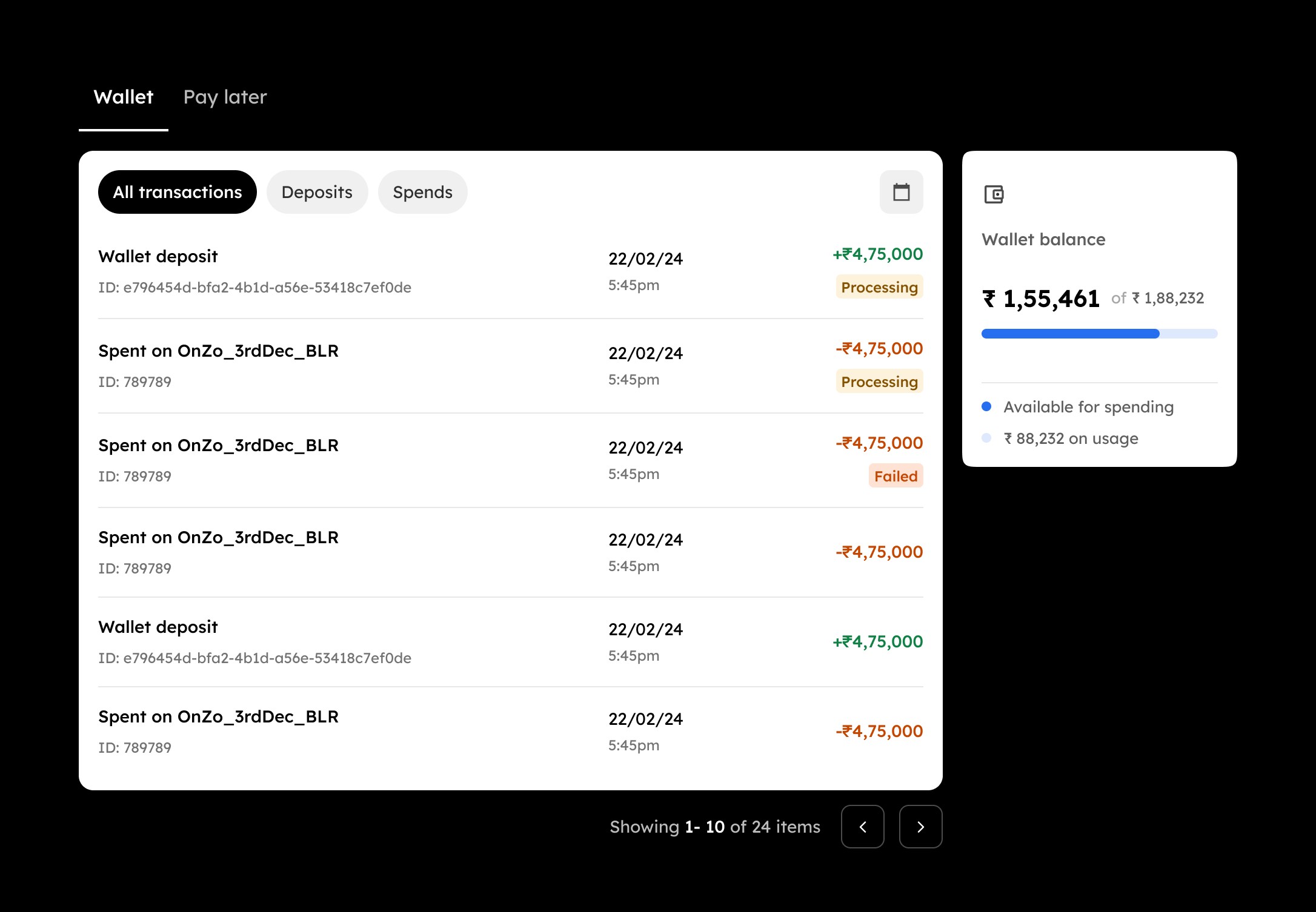
In the payment and review page, users can review their creatives, billing details and choose a payment method that fits their setup. Zomato Wallet allows partners to preload funds using any regular payment mode and use the balance instantly. Pay Later lets partners run campaigns without upfront payment, with the spend automatically deducted from their daily order earnings (SOA), making it a preferred option for small and mid‑scale restaurants. For larger chains with long‑standing relationships, Zomato Credit Line provides an extended billing cycle, allowing them to run campaigns at scale and settle dues later without operational interruptions.
# Campaign Tracking and Day‑to‑Day Management
The tracking page lists all running and past campaigns in a clear table with the key metrics needed to monitor performance. Users can pause, resume, edit or duplicate campaigns, and owners can approve or reject campaigns created by managers. It’s a straightforward workspace that keeps day‑to‑day tracking easy, with deeper analysis available behind a click within reports
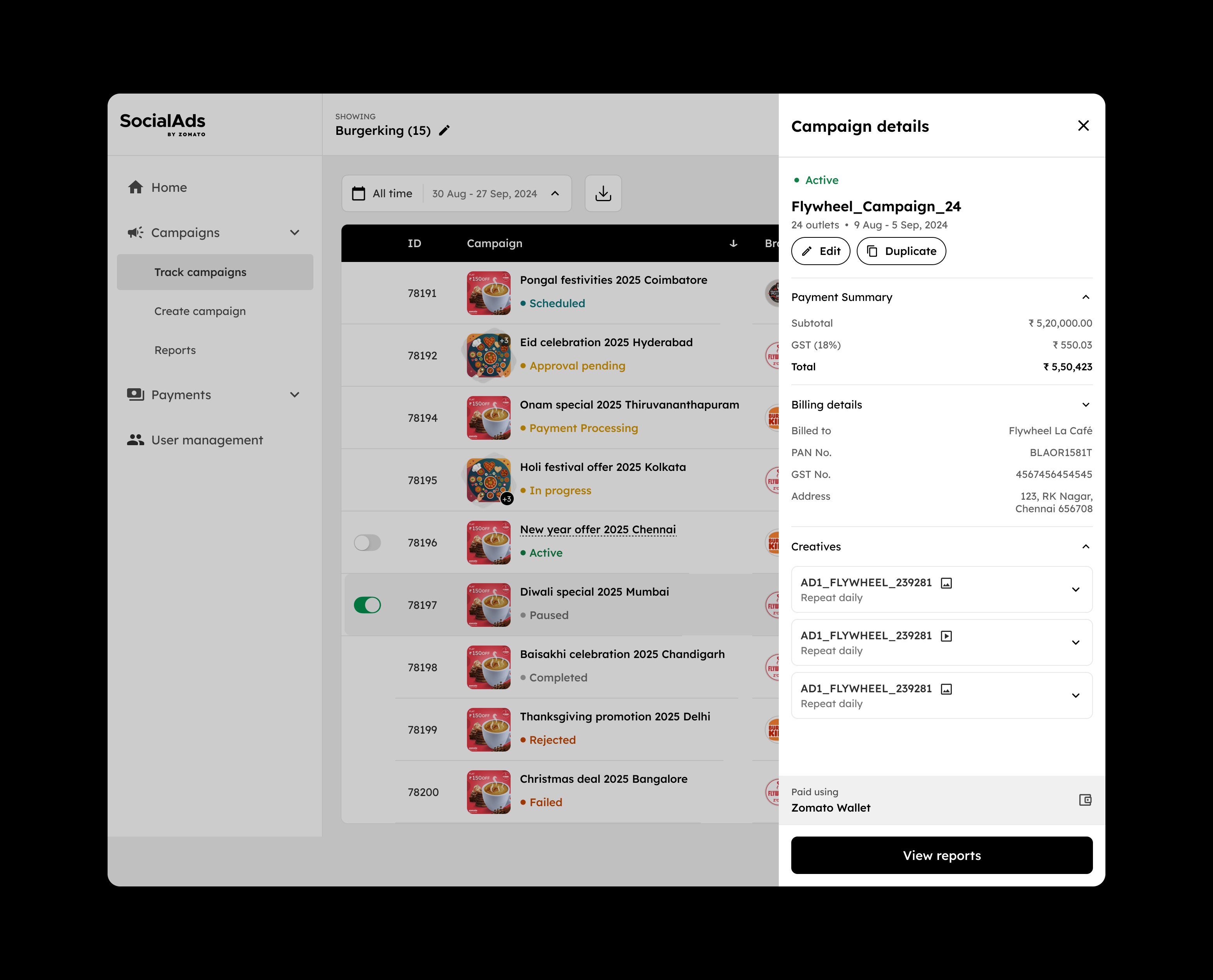
# Handling Heavy Campaign Downloads
When brands manage a large number of campaigns, preparing a full download of the entire list can take anywhere from a few seconds to several minutes. Instead of relying on email-based downloads, which pull users out of the product and interrupt the workflow, we added an in-product flow that prepares the file in the background and shows a live progress state until it is ready. Users can return anytime to download or discard it, and each export is generated based on the filters they select.
# Reviewing and Approving Campaigns on Mobile
Since restaurant owners often review campaigns on mobile, we built a lightweight approval flow that does not require the full dashboard. Whenever a manager submits a new campaign, owners receive an SMS, a WhatsApp message and an email, each linking them directly to a simple review screen after login. The layout is a V2 web version of the campaign‑details sidesheet , designed to be scalable across use cases and to keep developer effort light. It still provides owners a clear view of key campaign, billing and creative details so they can approve or reject in a single tap.
# Transparent and Simplified Metrics That Build Trust in Reporting
The reports page brings together performance data from both Zomato and Meta or Google Ads, but is structured around simplified metrics that make it easy for partners to understand the overall performance without needing to interpret complex platform data. By surfacing clear measures like spend, impressions, clicks, ROAS and other related metrics, along with day‑by‑day trends and breakdowns at the day, creative and platform levels, the tool gives a complete picture of how the campaign performed. This level of clarity helps build trust in the system and gives users confidence that they can reliably track and evaluate their campaigns within the platform itself.
# Transaction History for Wallet and Credit Usage
The transaction ledger provides a clear list of all payments made through the supported methods for that specific user, along with basic details like transaction ID, date, time and status. It includes simple filters and an overview of available wallet balance or remaining credit so users can track their spends and deposits with peace of mind. Each transaction also has an invoice available on a separate page for easy reference.
# Organising Teams with a Simplified User Management
We wanted the user management page to give a clear overview of everyone associated with the restaurant brand, grouped by roles. Currently, Brand admins and managers can add or remove members when needed, and each role comes with well‑defined permissions to keep responsibilities organised and predictable. The layout makes it easy for teams to understand who has access to what, helping brands maintain control as their team grows.
# Updating the missing DP
Some brands, especially small and mid‑scale ones, often do not have display pictures on their Zomato restaurant pages, leaving 10–15% of profiles without a DP. While this may be acceptable on the platform, it becomes essential for running ads since ad performance depends heavily on brand imagery. To address this, we added a change dp functionality within Manage Brand settings that lets partners update their DP instantly within the product, reducing the effort for social ads ops teams who previously sourced these missing DPs manually. The same section also allows users to update GST and bank details when needed. Along with this, For first‑time campaign creators, a soft warning within the creation flow nudges them to add a DP if it is missing.
Testing the Waters
Validating the product in the field before expanding its rollout
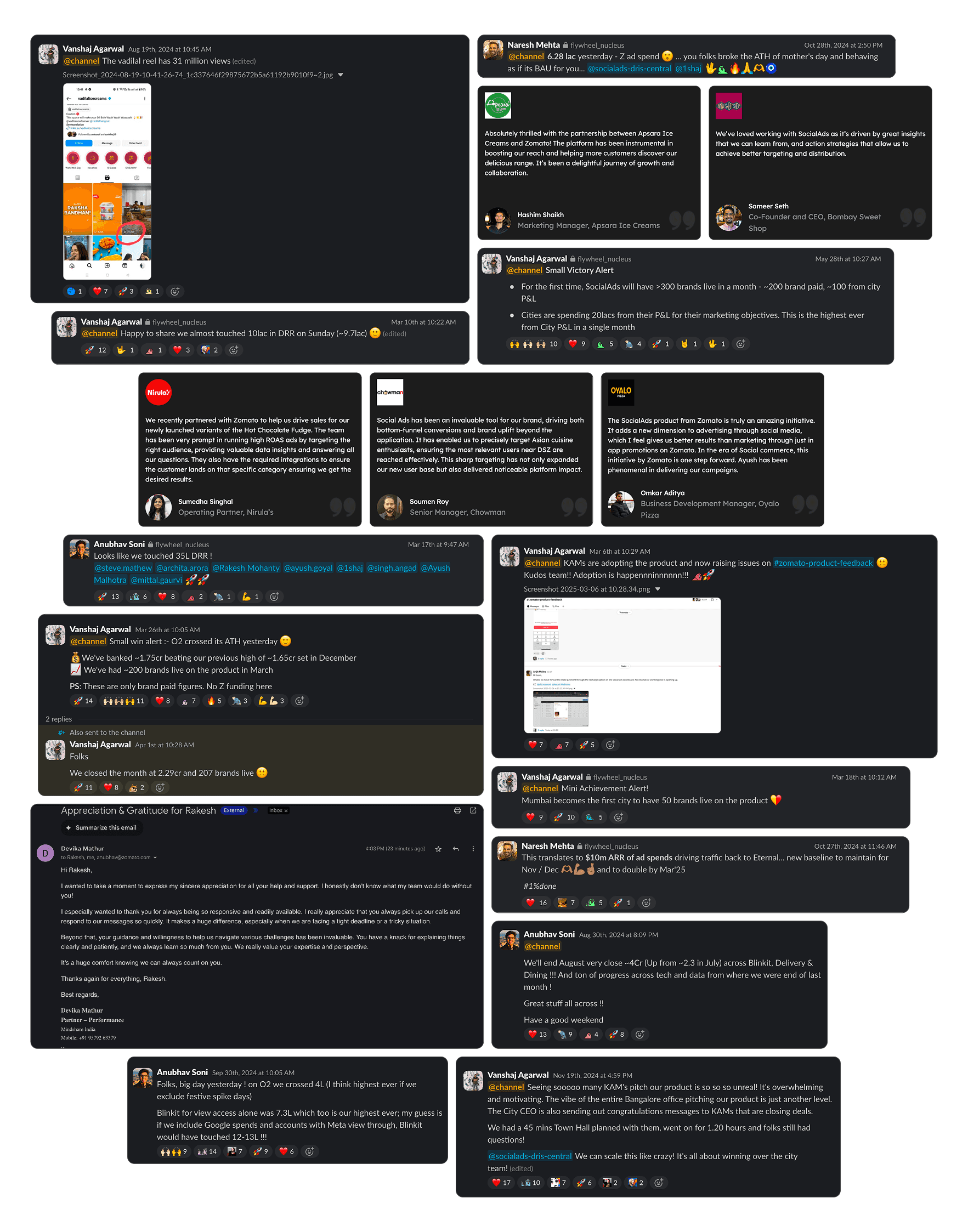
Before launch, we shared access to the tool with KAMs in Gurgaon and several other key cities, and conducted a product demo in a town hall to understand how it fit into their workflows and gather early impressions. Their feedback helped refine a few areas, and the overall response gave us confidence that we were building something useful for them.
Expanding the Rollout
Restaurant partners loved it!
We then opened the tool to around 5,000 restaurants as a controlled beta, and the response was very positive. Brand managers and restaurant partners shared a mix of compliments and practical suggestions, which helped us understand what mattered most to them. Instead of acting on every ask, we evaluated each input based on its impact, how often it came up, and whether it aligned with where the product was headed.
This phase was more about sharpening the MVP than expanding it endlessly. We shipped a few thoughtful improvements, and once things felt stable across the board, we steadily expanded the rollout until it reached all eligible partners.
Business impact
1,080+ brands ran Social Ads, generating ₹21+ cr in ad spend, with most months exceeding ₹1.5 cr
While the month‑on‑month curve naturally fluctuated, the overall trend showed steady adoption and a growing sense of trust in the tool. Some brands leaned into the platform more deeply than others, with names like Wendys India, Chinese Wok, and Ovenstory consistently appearing among the highest spenders.
Beyond spends, we also saw encouraging behavioural shifts. Many restaurant owners who had never run ads independently before completed onboarding and started their first campaign directly through the product. Even though daily traffic varied, the funnel data showed a healthy pattern of new users landing, exploring and completing registration, steady enough to indicate organic product pull without heavy marketing.Comparing to the legacy tool and the manual process, Internal teams reported fewer escalations. As a result, more campaigns went live without lot of back‑and‑forth coordination.
While every feature played a part, the biggest win was momentum. We were able to find a consistent pattern of usage, repeat campaigns and growing spends. It showed that the tool wasn’t just functional; it was genuinely becoming a reliable part of how restaurant brands managed their social media marketing.
~2.8
average yearly ROAS with multiple high‑performing periods crossing 3+.
~60%
of brands ran multiple campaigns over the year
3x
growth in monthly active advertisers over the year
Whats next?
Taking the next steps toward an autopilot‑driven, streamlined system
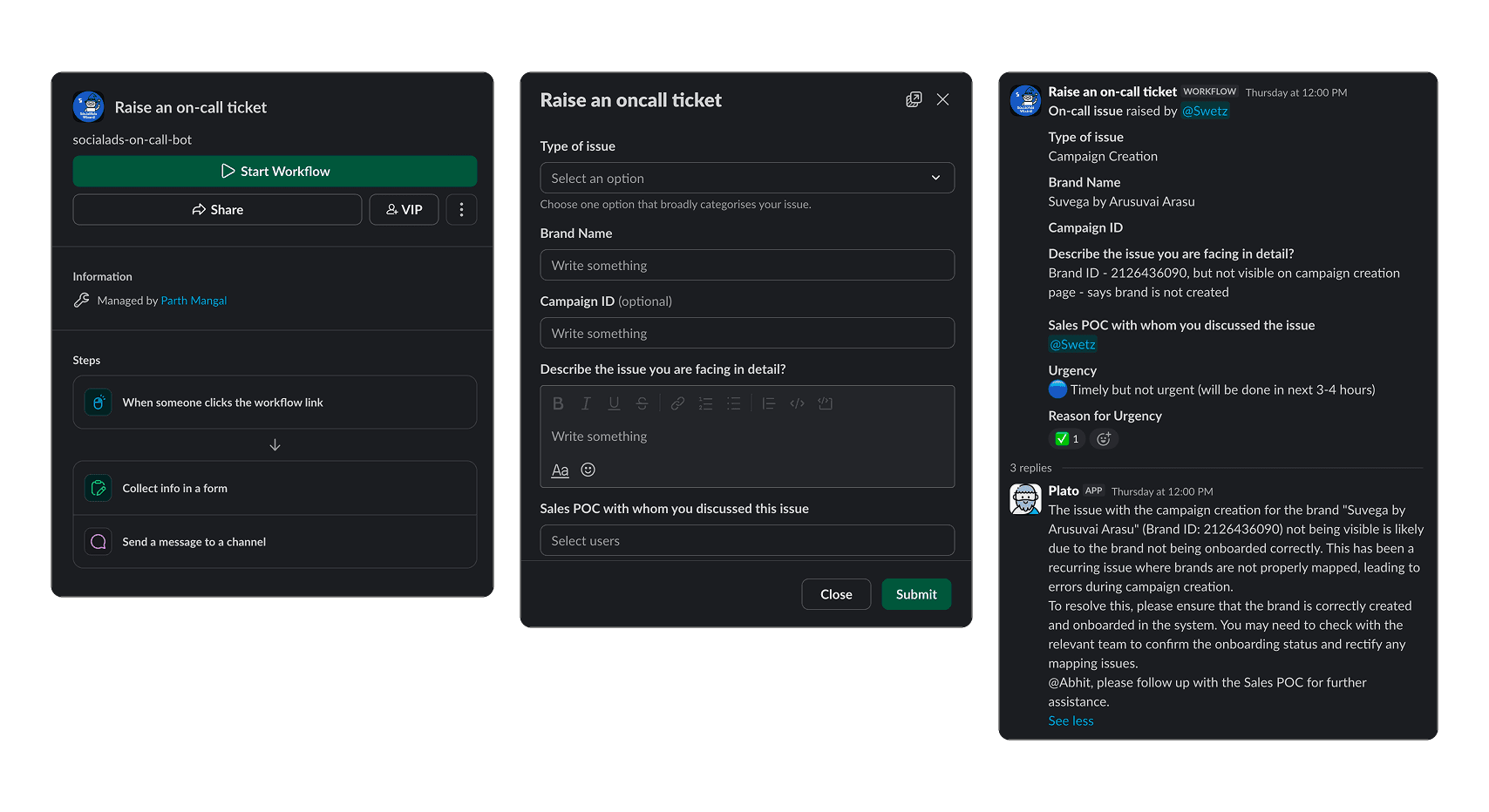
Even though the new Social Ads tool already cuts down a large part of the manual effort, there are still a few areas where efficiency can improve. Our next step is to push the system closer to an autopilot mode so most campaigns can run without someone stepping in.
A key part of this is an internal bot that can automatically detect issues raised by KAMs or restaurant partners and redirect them to the right point of contact based on priority. Since most product‑level gaps are already solved and escalations have become rare, automating this flow keeps the system lightweight and reduces the need for continuous bandwidth from the team. The idea is that RPs and KAMs should be able to create and manage their campaigns independently in most situations. And there is always a room for quality of life improvements
Reflection & Takeaways
# Taking on my first 0 —> 1 at a new vertical in Zomato
It is not often that you get the chance to design a zero to one product as a solo designer at a company with a large consumer base like Zomato. I genuinely valued every part of it. This was my first time owning something at this scale, and in the beginning I honestly was not sure if I could pull it off. But that feeling slowly turned into motivation. It became a chance to prove myself to a new team, in a new vertical, on a problem that impacted thousands of businesses.
# No PM, Just curiosity and collaboration
Since the team was lean, I had to work with different functions right from the start. Without a dedicated product manager, I worked directly with business heads and the engineering lead to understand the problem space and shape the MVP. As the product evolved, I spent a lot of time with backend and frontend developers, and later with KAMs and the central team for ground level understanding and user testings. This kind of collaboration taught me how to communicate design decisions clearly, handle ambiguity and respond quickly when new constraints showed up.
# Being the voice of the user in a business first environment
Throughout the project, I often found myself being the one who spoke for the users. Social Ads involved a lot of business focused decisions, and in many conversations I had to remind the team about usability, clarity and long term trust. Not in a confrontational way, but as voice to balance out the system. and to make sure the final product stayed grounded in what real partners needed
# A project that opened new doors and shaped my confidence
I feel grateful to the people who believed me that i could pull this off. Naresh, Anubhav Soni, Mayank Ladia and Ritesh from Social Ads leadership, and from the design team Joy Banerjee, VP of Design, and Priyanka, Design Lead. Their trust made a big difference. This project taught me how to navigate complexity, break down unclear problem spaces into clear actions and deliver an MVP on time even when the roadmap was muddy. More importantly, it gave me the confidence to take on larger problems, and it even opened doors for three more zero to one product opportunities within Zomato in the same year.